
Hong Kong Mahjong Training Mode — Learn by Playing
Training mode lets you practice Hong Kong Mahjong online for free against easy bot opponents. On every discard turn, the app highlights which tiles to keep and which to discard — with a short explanation of why. No account or signup needed: just click and play. It's the fastest way to learn mahjong with hints guiding every decision.

How It Works
No signup, no login, no email. You're matched instantly with three easy bots and the game begins within seconds.
Standard HK rules — draw, discard, chow, pung, kong, mahjong. The 60-second turn timer gives you plenty of time to think. Bots use heuristic logic so they play reasonably but won't punish your mistakes harshly.
Each tile in your hand gets a colour-coded border: green means keep, orange means consider discarding. A tooltip banner above your hand explains the reasoning — which tile to discard in mahjong and why.
What the Hints Tell You
The mahjong tile coaching tool analyses your hand every turn and picks the most useful tip. Here are the kinds of advice you'll see:
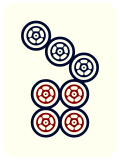
Ready Pung — "You have three identical tiles"
Three of the same tile is a completed pung (triplet). The hint tells you to keep all three.
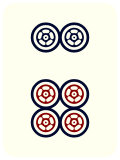 — Keep: ready pung of 6 Dots
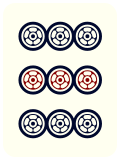
Completed Chow — "This tile completes a sequence"
Three consecutive tiles in the same suit form a chow (sequence). The hint highlights that all three are worth keeping.
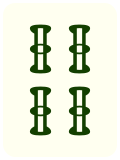
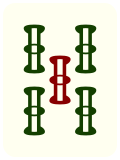
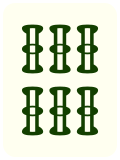 — Keep: 4–5–6 Bamboo chow
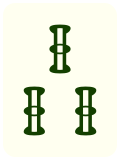
Isolated Tile — "Safe to discard"
A tile that isn't connected to anything in your hand — no pair, no sequence potential, no matching suit emphasis. The mahjong discard guide marks it orange.
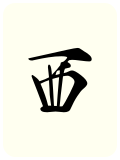 — Discard: isolated West Wind, no pung potential
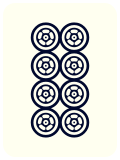
Tenpai Detection — "You're one tile away from winning!"
When your hand is one tile away from a winning combination, the hint tells you exactly which tile to discard and which tiles you're waiting on to complete your hand.
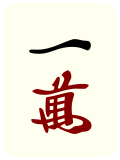
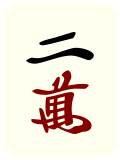
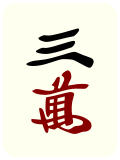 |
|
 |
| |
|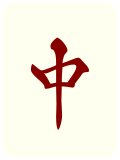 |
|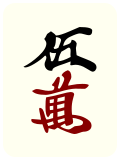 — waiting on a pair to win!
Who Is Training Mode For?
Absolute beginners who have never played mahjong and want to learn the basics by doing — not just reading rules. The hints act as an in-game coach so you always know what to do next.
Returning players who played mahjong years ago (maybe at family gatherings) and want a refresher before jumping into competitive games. The 60-second timer gives you plenty of breathing room.
Players learning HK rules specifically — if you're used to Japanese Riichi or American Mahjong and want to pick up Hong Kong style, training mode teaches the differences through practice: no yaku table, faan-based scoring, different claiming rules.
Training Mode vs Regular Games
Not sure which mode to pick? Here's how they compare:
| Training | Beginner | Advanced | |
|---|---|---|---|
| Account required | No | Yes (free) | Yes (free) |
| Tile hints | Every turn | No | No |
| Turn timer | 60 seconds | 10 seconds | 7 seconds |
| Minimum faan to win | None (chicken hand OK) | None (chicken hand OK) | 3 faan |
| Bot difficulty | Easy | Mixed | Mixed |
| Leaderboard | No | Yes | Yes |
Frequently Asked Questions
Do I need an account to use training mode?
No. Training mode is completely free and requires no signup. Click "Training Mode" on the homepage and you'll be playing within seconds.
What do the coloured tile borders mean?
Green = keep this tile (it's part of a useful group). Orange = consider discarding (it's isolated or unlikely to help you win).
Is training mode the same as a real game?
Yes — it's a full 4-player Hong Kong Mahjong game with standard rules. The differences are easier bots, a longer turn timer (60 seconds), and per-tile coaching hints on every discard turn.
Can I switch to regular games after training?
Absolutely. Create a free account to play Beginner games (any winning hand counts, 10-second turns) or Advanced games (3-faan minimum, 7-second turns) with leaderboard tracking.
Ready to try it?
Play mahjong online free with no signup — training mode is the easiest way to start.